The Imports and ExportsHelper tabs show the modules and the functions they import and export. Exported functions are functions modules expose to other modules for their own uses. To use the functions other modules export, a module must import them.
Exports
The Exports tab displays every function in every module loaded by the target process. While debugging, this list is kept up-to-date as modules are loaded and unloaded (with spam protection to avoid consuming resources when the target rapidly unloads and reloads modules).
Modules are shown by file name and internal name (format: file [internal]). These names do not always match. For example, some may have case differences and some may be entirely different names.
Click a + (or double-click the row) to expand the module and display its functions. Each function has an address and an ordinal. You may notice several functions with the same address. These are typically stub functions that do nothing but return, but are always functions that perform the exact same actions, instruction-for-instruction, and so have been stored to one location in the code and share the same address.
Ordinals are technically an alternative way to call an imported function, however they are virtually never used.
By right-clicking a function, you can go directly to that function in the current code window, or you can set a software execute breakpoint on the function.
Imports
Imports are usually more useful, as they show you what functions the target process (and all other modules) will actually be using. Modules such as ntdll.dll export hundreds of functions while only a handful are ever actually used by any given application.
Here, every module is listed in the target process. By expanding a module, you will see all the modules to which that module is statically linked (the modules from which the source module imports some functions). By expanding one of those modules, you will see the functions from that module used by the original module.
For example, moduleLuxorAmun.exe loads moduleluxoramunres.dll and from that module it uses function mainDLLInit.
By right-clicking a function, you can go directly to that function in the current code window, or you can set a software execute breakpoint on the function.


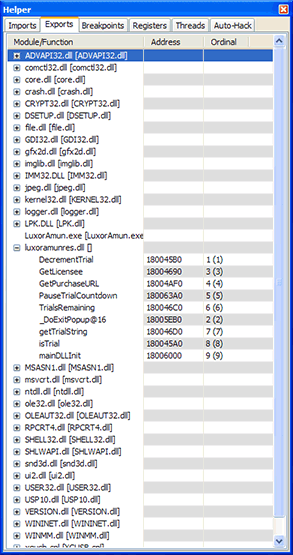 Modules are shown by file name and internal name (format: file [internal]). These names do not always match. For example, some may have case differences and some may be entirely different names.
 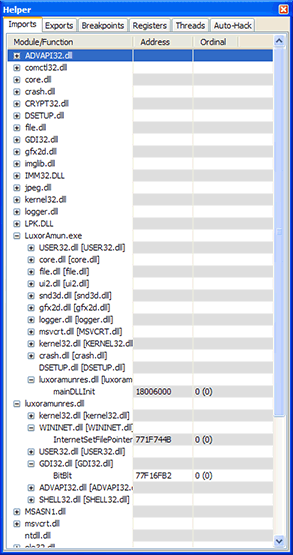 Here, every module is listed in the target process. By expanding a module, you will see all the modules to which that module is statically linked (the modules from which the source module imports some functions). By expanding one of those modules, you will see the functions from that module used by the original module.